🚀 Novedad: Copiloto Legal con IA y Web de Captación ya disponibles. Descúbrelos

Introduction to billing

Billing Manual

Lexdigo client communication

Welcome to Lexdigo’s Billing Manual

Welcome to Lexdigo’s Billing Manual, your definitive guide to efficiently managing the billing of your services. In this manual, you will learn how to create, manage, and track your invoices clearly and accurately, ensuring that the entire billing process is carried out in an orderly manner and in line with your needs.

Advanced Billing Tools

At Lexdigo, we have integrated advanced tools that make hourly or unit-based billing easier. This way, you will have full control over the time spent on each task and its corresponding billing. This functionality is ideal for ensuring that every aspect of your billing is perfectly aligned with your needs and the applicable regulations.

Financial Process Optimization

Below, we explain how to use these tools to optimize your financial processes. In addition, you will learn how to improve accuracy in your invoices, which will allow you to manage your billing more efficiently. This will help you maintain a more organized workflow, ensuring that no detail is missed and that you can focus on what matters most: growing your business. With these simple steps, you will achieve efficient billing management at all times, saving time and reducing the risk of errors.
1. Invoice creation

You will be able to create invoices quickly in a few simple steps.

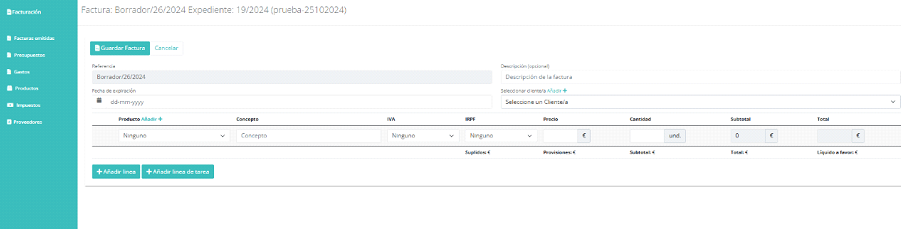
⦁ We will access “Create an invoice”; we will need to select a case file and the invoice issuer (individual or as a company).

billing manual1

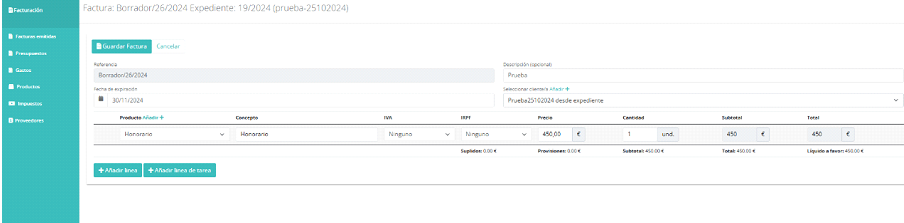
⦁ Once you have added all the necessary data to create the invoice, the platform will automatically display the totals.

⦁ In the records, you will be able to view all invoices created, as well as the person who generated them, the case file they are associated with, and the corresponding client.

billing manual 2

In the Actions section, we can validate our invoice.

Once the invoice has been paid, whether in cash, by card, or by bank transfer, you must click “Record Transaction”.

Afterwards, you will be able to verify that it appears as “collected” in the invoice register.

Adapt Lexdigo’s Time and Billing Software to Your Firm

Adapt Lexdigo’s time and billing software to the specific needs of your firm and clients. Thanks to our customizable solutions, you will be able to efficiently manage the time dedicated to each case, allowing you to generate detailed invoices according to your rates. In this way, you optimize both your firm’s time and resources.

Flexibility and Customization for Your Legal Practice

With Lexdigo, you will enjoy the flexibility to configure the system according to the particularities of your legal practice. This not only improves your firm’s administration, but also helps increase profitability. Customizing the tools will allow you to adapt them to your needs and those of your clients, ensuring a smooth, hassle-free experience.

Creation of Custom Products and Taxes

For example, you will be able to create custom products and taxes that will streamline and speed up the billing process. This ensures that each invoice fits the specifics of each case, reducing errors and increasing billing accuracy. With these features, you can optimize your firm’s financial management and focus on what matters most: providing quality service to your clients.

⦁ By creating taxes, you can issue your invoices without taxes

⦁ Easy deletion of draft invoices.

Este sitio web utiliza cookies para que usted tenga la mejor experiencia de usuario. Si continúa navegando está dando su consentimiento para la aceptación de las mencionadas cookies y la aceptación de nuestra política de cookies, pinche el enlace para mayor información.plugin cookies

ACEPTAR
Aviso de cookies
Lexdigo User Manual
Lexdigo User Manual